COMPANY: Topaz Labs | URL: (See Buy & Info links below) | TYPE: Plug-in | PLATFORM: Mac, Windows | PRICE: $49.99
**Save 15% off ALL Topaz products at any time with our coupon code! See Buy button below for details**

Consider purchasing the Topaz Photoshop Plug-In Bundle instead of just Topaz Adjust!

The Bundle includes 10 Topaz plug-ins for only $299.99.
You can specify the bundle option while at the Topaz Labs shopping cart (see Buy link below).
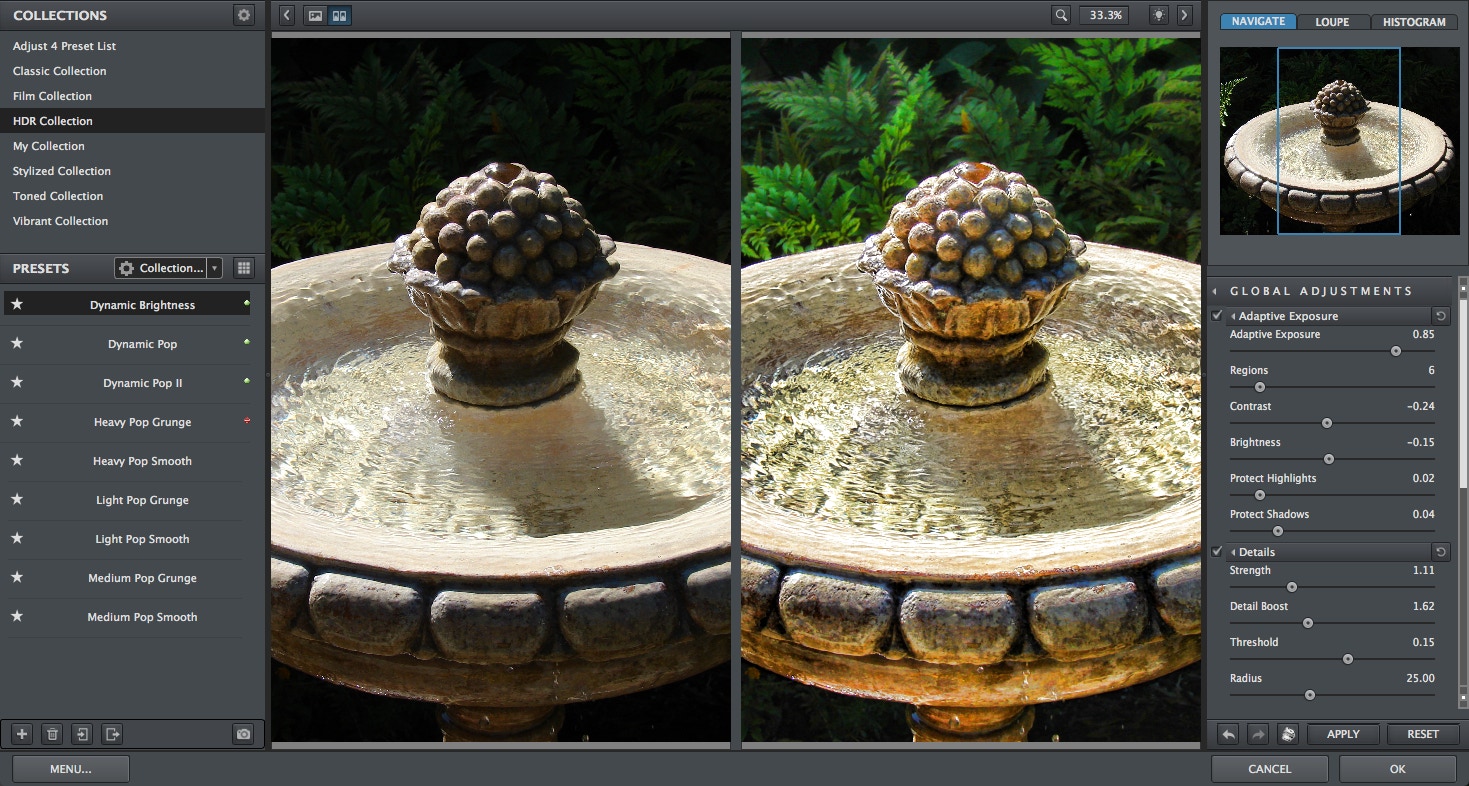
Above and below: Originals plus Adjust treated images. Topaz Adjust creates a great artistic HDR effect, revealing details and adding "pop" to images.
Buy "Creative exposure" takes on a whole new meaning with the new Topaz Adjust 5 image manipulation plug-in for Adobe Photoshop. Easily and effectively take full control over image exposure, color and detail for stunning creative effects and automated exposure correction. Fly through a variety of dynamic photographic looks and fine-tune them to realize your artistic vision.

Adjust uses advanced algorithms to achieve unique exposure effects and adjustments in seconds. It offers the user full control over creative exposure, color and detail effects, and has the ability to save and reuse presets for maximum convenience.

Adjust Features

Adjust puts infinite customizability at your fingertips with powerful yet intuitive controls that control the full capabilities of the software. Achieve an unlimited amount of possibilities, tweak presets to fit your photo, and create your own toolbox of photo looks and styles.

•Add instant dazzle and pop to your photos with a unique presets system packed with included looks and effects
•Customize your results with intuitive and powerful adjustment sliders for Exposure, Detail, Color, and Noise
•Harness professional workflow advantages designed to minimize the time you spend in front of the computer
•Adjust makes it easy to creatively adjust photo exposure, detail, and color for photo correction and effects.
Experience state-of-the-art image manipulation technology, including an extremely good noise removal tool
Correct underexposed and overexposed images with intelligent exposure detection
Create HDR-like images using only one exposure
Recover and enhance previously obscured detail in the Details tab
Apply unique creative exposure, detail, and color effects not found anywhere else
•Works with smart objects as a non-destructive smart filter
•Use Topaz DeNoise technology for noise reduction
•Increased the range of Adaptive Exposure adjustments for the possibility of more extreme effects.
Take advantage of multiple CPUs for faster processing
Operates in both 8-bit and 16-bit
Save and reuse presets for maximum convenience (also includes presets)
•Increase the range of Adaptive Exposure adjustment for more extreme effects

New in Adjust 5

•New preset categories with with over 100 presets, for everything from subtle photo pops and warmth/cool adjustments to HDR effects, film effects and more
•Selective adjustment brush for burning, dodging, smoothing, and brushing out effects
•Apply button, which allows you to stack multiple effects
•Preset collections, organized into unique groups. Also includes a My Collection where your user-made presets are saved
•Transparency slider to control how strong the overall effect is applied to your image
•Finishing touches. Features options for borders, grain, warmth, vignettes and more
•Histogram. Shows the tonal range of your image
•Curve tool. Easily adjust image tonality to help emphasize tones, contrast and brightness
•Split Screen. Use the 2-screen split view for easy before and after comparison
•Enhancements to the interface layout and tools

System requirements:

Windows
•Windows XP, Windows Vista, or Windows 7 (32-bit and 64-bit)
•1 GB RAM
•Adobe Photoshop 7 through CS4, Adobe Photoshop Elements 1-8, or other editors that support Photoshop plug-ins (Irfanview, PaintShop Pro, etc.)

Windows only:
•Supports 64-bit Photoshop CS4 on Windows Vista 64-bit, huge file support

Mac
•Intel-based Mac, OS-X 10.4-10.6. PowerPC processors (G4 or G5) are not supported
•1 GB RAM
•Adobe Photoshop CS3 or CS4, Adobe Photoshop Elements 6-8
15% DISCOUNT off Adjust!

Click here
and use "
plugsnpixels" as the coupon code
(no expiration)
More Info
Effects gallery